Shocking Charts Predict 2014 Crash

Multiple charts exist which predict another recession this year!

leverage_loan_chart

Now, I am normally a very positive person.  In fact my first post for the new year was very hopeful.  But recently I found not one but two charts which show we could have a repeat of the recent Great Recession.

The first chart above shows how the Federal Reserve and Quantitative Easing have allowed financial institutions to run wild again.  In summary, the leveraged lending is out of control.   For the past year it has risen as fast and to the same level as the year before the 2008 Great Recession.
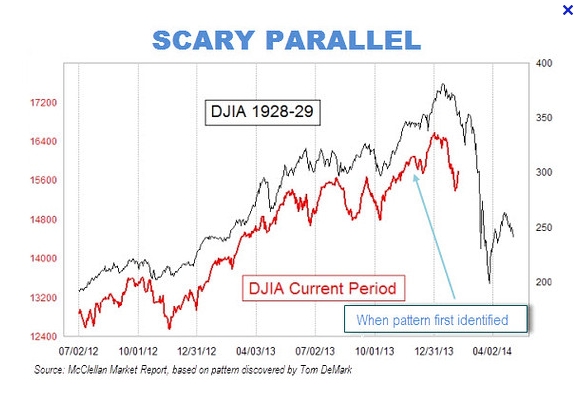
scary_djia_chartThe second chart above shows how the Dow Jones Industrial Average (DJIA) is the same as 1929.   It has followed almost identically as it did in the years leading up to the Great Depression in 1929.

Big name investors like Warren Buffet and George Soros have cut their stock investments or shorted the market.

If another Great Recession occurs, riots will take place that are greater than the Occupy Wall Street demonstrations and President Obama will face impeachment.

Can another Great Recession be stopped?  Yes, the Federal Reserve can take two actions.

1. Put restrictions on QE funds to minimize leveraged lending.

2. Stop issuing QE funds to institutions that use “expected rent” as collateral.

You can make a difference by voting for the following White House Petition.

wh.gov/lQLCi

Thanks for reading this.

Wall Street Open 24 x 7

Banker’s hours are so 19th Century!  We are talking about stock exchanges being open ALL DAY Monday through Friday!  That is my prediction.

wallstreet24x7

This has several advantages to the general public.

First, I predict that you will be able to buy or sell stock at any time (except weekends)  just like buying a book at Amazon.com.

After-hour trading has gradually increased over the years as stock markets make more stocks available for trade.  Also stock exchanges have experienced mergers and acquisitions involving exchanges in other countries.  So the exchanges are becoming international which requires support for many different time zones.

Secondly, no longer will institutions sneak in sales “at the close” or use “imbalance only orders” to modify the closing price.

Institutions have been using these “at the bell” prices when convenient or they cancel them if they won’t be profitable.  This distorts the market price.

So 24 by 7 stock exchanges are good for the general public but bad for corporations.  So it may be a while before we see them.  Probably after some huge foreign corporation implements them.

Seminar: Data Management for Everyone

Image

tm-data-mgmt

Advance Your Agenda

I came across this picture I had saved a while back.advance your agenda

This photo screams “Move on.  Do not stand still.  You will be a sitting duck aka target.”

It also says “Do something with your life. Learn something. Grow.”

Maybe it would sink in better if I woke up facing this picture every day.

Kelley’s Software Installation & Upgrade Rules

Recently a site was performing a software upgrade over the weekend.  No big deal, everyone thought, because this happens thousands of times across the world every day.

stoprobocallsYours truly was on call to support the site if any issues arose.

Needless to say they called Sunday afternoon after message traffic had gotten stuck in their queues for several hours and queue refreshes had not made a difference.

What I learned about the site was amazing.  They had performed not one, not two, but three software upgrades all at once.  They only backed up the system at the beginning.  They were the first site to go to this release.

Well, this prompted me to draft the following list of rules.

  1. Never install release 1.0 of anything.
  2. Never be the first site for any release.
  3. Always read the release notes and review the installation instructions.
  4. Always hold a readiness review meeting to answer questions.
  5. Never start an installation or upgrade without a backup of both your database and your system.
  6. Never install or upgrade more than two releases at a time.
  7. Always backup your databases before your second upgrade.
  8. Optionally backup your system before your second upgrade.
  9. Always backup both your database and your system after the last release.
  10.  Always test the functionality mentioned in the release notes.
  11.  Always examine all the log files for errors.
  12.  Always hold a party when the smoke clears aka the system is stable.

Now I feel a whole lot better.  Creating this list was quite a catharsis.

Let me know if you agree or have something to add.

Sybase SQL Challenge – Sum Of Max Values

--------DATA in Cat_Tbl---------------------------
Cat1           Cat2          Value
a              e1            113
b              e1            14
a              e2            15
c              e3            13
a              e1            13
a              e2            11
c              e4            1

Sybase

PROBLEM:

For each distinct value in Cat1, user wants to find maximum of Values grouped by Cat2 and then sum them up. 


Step 1: User wants to extract the following rows for example where Cat1 = ‘a’.

Cat1 Cat2 Value 
a    e1   113 
a    e2   15 
a    e1   13 
a    e2   11

Step 2: User wants to extract maximum corresponding to Cat1 and Cat2:

Cat1 Cat2 Value 
a    e1   113 
a    e2   15

Step 3: User wants to sum the Values for Cat1.

Cat1 SumOfValueColumn 
a    128 
b    14 
c    14

stackoverflow


SOLUTION 1 USING TEMPORARY TABLE #Max_Cat_Tbl

select Cat1, Cat2, max(Value) Maxvalue 
into #Max_Cat_Tbl from Cat_Tbl 
group by Cat1, Cat2 order by 1, 2 
select Cat1, sum(Maxvalue) 
from #Max_Cat_Tbl 
group by Cat1 
order by Cat1 
drop table #Max_Cat_Tbl 
go

SOLUTION 2 USING VIEW Max_Cat_Tbl_View

create view Max_Cat_Tbl_View 
( Cat1, Cat2, Maxvalue ) as 
select Cat1, Cat2, max(Value) 
from Cat_Tbl 
group by Cat1, Cat2 
select Cat1, sum(Maxvalue) 
from Max_Cat_Tbl_View 
group by Cat1 
order by Cat1 
go

Good SQL, good night.

How do you catch a log suspend error in Sybase?

Sybase

You have two issues.

One is the UNIX/Linux script does not detect errors correctly.

Secondly the transaction log is filling up frequently.

First the script needs to have the standard output AND the error output go to your log file. When you use the > it is using file descriptor 1. When you want to capture error output you need to use 2> for file descriptor 2. So the command would look like the following.

isql    > error.log    2> error.log

Better yet, use this.

isql    2>&1    > error.log

The previous command says to have file descriptor 2 go to file descriptor 1 which goes to a log file.

Now to detect errors, look for “Msg” which all Sybase errors have in front by using the grep command.

stackoverflow


Secondly to resolve the transaction log space, you need to grow the size of the log which should be on its own device separate from data. Then you need to set the threshold to dump aka flush the completed transactions to a disk file automatically. You need to investigate the following commands to do this.

alter database, sp_helpthreshold, sp_addthreshold, sp_thresholdaction

Good SQL, good night.

Does Sybase support string types that it doesn’t right trim?

Yes.

Sybase

For char columns to be fixed length, you must use the not null attribute.

For variable length columns, use varchar or char with a null attribute.

Then to measure the real data size including trailing spaces use the datalength function not the len function nor the charlength function.

Good SQL, good night.

stackoverflow

Reverse Engineer Create Table Schema for Sybase or SQL Server

QUESTION:  Is there any way to fetch the create table schema including the textual representation of actual Sybase datatypes (instead of the number)?

ANSWER: Yes

Sybase Query Analyzer – showplan

QUESTION:

I’m querying Sybase database from C# code. Is there any good query analyzer to understand the exact queries being generated like the Query Analyzer for Sql Server?

ANSWER:

You can set some Sybase variables to see the Query Plan such as the following:

set showplan  on
set statistics io on
set statistics time on
exec my_proc (my_arg1, my_arg2, ...)
go

I have put this into a shell script to pass the command line arguments including stored procedure name and parameters.

isql  -Uxxx   -Pyyy   <<-_EOF_
set showplan  on
set statistics io on
set statistics time on
exec $*
go
_EOF_

You use this to see if there are any table scans which should be avoided at all costs.

Good SQL, good night.